A Project Handoff Before a Long Break
A project handoff before a long break captures its current state, next decision, and restart materials so you can return without reconstructing the work.
The common mistake in a project handoff before a long break is to leave a pile of files and assume the project will explain itself later. It costs you a clear re-entry point: the open questions, the reason behind a choice, or the one document that made sense when you last worked on it can all become hard to recover. A useful handoff is not a full history. It is a compact record that lets you understand where things stand, what needs deciding, and what to open when you return.
Set aside a short session near the end of your last work period. Use a project note, a plain text file, or a document stored beside the working materials. Keep it in the place you are most likely to look first, such as the project folder in Google Drive, a pinned Notion page, or the top of a paper notebook. Then build the handoff in the order you will need it later.
What is the project’s current state?
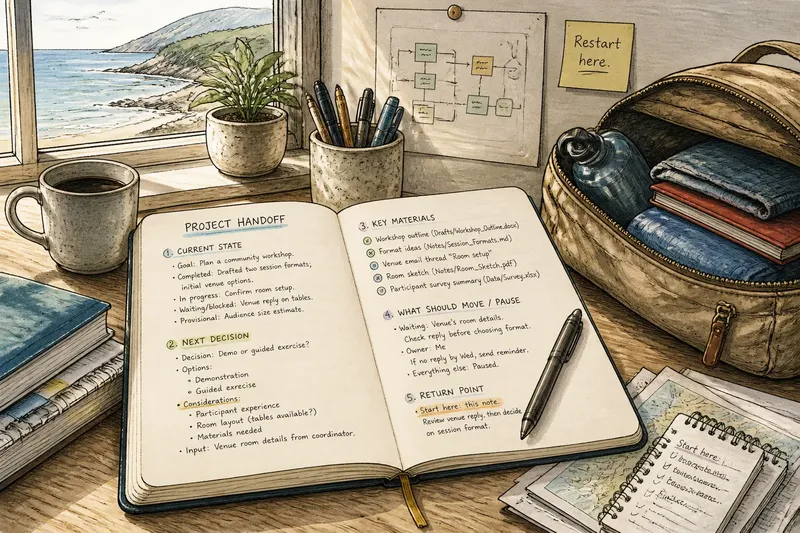
Begin with a plain-language snapshot. Describe the project’s present condition, not every task you completed along the way. A reader returning after a break needs to distinguish what is settled from what remains in motion.
Write a few sentences that answer these questions:
- What is the project trying to produce or decide?
- What has been completed since the last meaningful checkpoint?
- What is currently underway, waiting, or blocked?
- Which assumptions or choices are still provisional?
Be precise about status. “The draft is ready” might mean it has been written, reviewed, or approved; those are different states. Prefer wording such as “The first draft is in the folder; the opening and section order still need review.” That sentence gives your returning self a reliable boundary around the work.
Separate facts from interpretation. “The supplier has not replied” is an observable status; “the supplier is probably uninterested” is a guess. If the guess matters, label it as one and note what could confirm or change it. This keeps an uncertain impression from quietly turning into a project decision.
Which decision comes next?
A handoff should identify the next decision, not merely name the next activity. “Work on the layout” does not tell you what judgment the work depends on. “Choose whether the guide is organized by audience or by task” gives you a question you can actually resume.
Record the decision in a form that makes its boundaries visible:
- Decision: What choice is waiting?
- Options: Which plausible alternatives are still open?
- Considerations: What should guide the choice?
- Input: Does another person, document, or event need to inform it?
Do not manufacture a decision if the project has not reached one. You can write, “No choice is ready yet; compare the two audience notes after the interview summary arrives.” That records what is genuinely pending and prevents a vague task from becoming an invented commitment.
Imagine you are preparing a small community workshop and have drafted two possible session formats. In the handoff, you note that the next decision is whether to use a demonstration or a guided exercise, that the room’s available tables may affect the choice, and that the venue coordinator has not confirmed the setup. When you return, the decision has a clear prompt and a specific piece of information to check, rather than a foggy instruction to “keep planning.”
What materials will help you restart?
List the materials by name and location. “See the notes” is a poor trail if the project contains several note files. Use titles, folder paths, or links that distinguish the relevant items: “Workshop outline, Drafts folder,” “Venue reply, email thread titled Room setup,” or a direct link to the current spreadsheet.
Include only materials that help establish the state or make the next decision. A handoff might point to:
- The current working draft, with its status stated.
- Source notes or reference material that informed an open choice.
- A message or document needed from someone else.
- A list of unresolved questions, if it is maintained separately.
- A physical item, such as a marked-up printout kept in a named folder or tray.
Make the working version unmistakable. If a folder contains “outline,” “outline-new,” and “outline-final,” say which file is current and whether the others are superseded or still useful. Avoid renaming or reorganizing everything just before leaving; a clear pointer can be more dependable than a rushed cleanup.
Check that the materials will remain accessible while you are away and when you return. For shared work, note any file that depends on another person’s access or a device you will not have with you. If a printout contains the only annotations, say where it is. The point is not to duplicate every file, but to prevent an important piece of context from being hidden in an unexpected place.
What should be paused, and what should keep moving?
Not every project needs someone to keep it moving during your absence. Mark the work as paused when nothing can usefully proceed without your attention. If another person has a real task they can complete, name that task and its boundary instead of leaving them with an open-ended request to “carry on.”
For shared work, make responsibilities legible. State who owns the next action, what they need, and what they should do if the expected input does not arrive. If no one has agreed to take ownership, do not imply that the work has been handed over. A clear pause is kinder and more accurate than an unattended assignment.
For an external dependency, record the present status and the point at which it matters again. “Waiting for the venue’s room details; check the reply before choosing the session format” connects the dependency to the decision. If nothing depends on the reply during your break, note that too, so a later reader does not mistake waiting for an emergency.
Use the smallest appropriate handoff. A personal project may need only a note to yourself. A collaborative project may need a brief message in Slack or email that identifies the owner, current status, and where the working materials live. Keep sensitive details in the appropriate project space rather than copying them into a broad message.
How do you make the return point easy to find?
Put a restart note where your future self will encounter it before opening several folders. A pinned project note, a calendar entry linked to the file, or a clearly titled document at the top of the project space can serve. Choose one primary location and refer to it from other places rather than scattering competing versions of the handoff.
End the note with a first return action that leads into the pending decision. “Open the venue reply, confirm the room arrangement, then choose the session format” is more useful than “resume workshop.” The action should be small enough to begin without first planning how to begin.
Then state what not to reopen. If the project purpose or an earlier choice is settled, say so briefly: “The workshop audience is set; only the session format remains open.” This protects settled work from needless reconsideration while leaving legitimate uncertainty visible.
Before you leave, read the handoff as if you had never seen the project. Can you identify the current version, the unfinished decision, and the first useful action? If not, add the missing pointer or clarify the status. You are aiming for orientation, not an archive of everything that happened.
What questions come up before you step away?
How much detail should a project handoff include?
Include enough to explain the present state, the next decision, and the materials needed to act on it. If a detail does not affect understanding or restart, leave it in the project’s existing records rather than expanding the handoff into a history.
Should I finish a task before my break or leave it open?
Finish it only if it can be completed cleanly without creating a rushed or misleading result. Otherwise, record what is done, what remains, and whether anyone else needs to act while you are away.
What if I do not know the next decision yet?
Write down what information or event would make the decision possible. Naming that trigger gives you a useful return point without pretending the project is more settled than it is.
Should I send the handoff to someone else?
Share it when another person needs to make a decision, continue an agreed task, or know that the work is paused. For a project that will simply wait, a well-placed note for yourself may be enough.
How can you check the handoff before leaving?
Read the note once from the perspective of someone returning cold. Check that each file name points to the intended material, each open choice is expressed as a question, and any work assigned to another person has a named owner. Remove instructions that ask for action without saying what action or why it matters.
Where a handoff involves shared records, deadlines, permissions, or obligations, follow the relevant workplace process and the instructions that apply to those materials. The project note should make the work easier to resume, not replace an agreed procedure.
A project handoff before a long break works best when it preserves a few useful distinctions: finished versus unfinished, fact versus assumption, and a task versus the decision that shapes it. The returning version of you does not need a perfect record. They need a trustworthy starting point, a visible question, and the right materials within reach.
One last useful move is to leave the project in a state that does not require a memory test: close with the current file identified, the return action written plainly, and the note saved where you expect to look first. That small act turns absence into a pause rather than a puzzle.