The Weekly Review That Starts with What Changed
A weekly review that starts with what changed helps you choose realistic anchors, notice finished work, and leave room for new commitments.
The common mistake in a weekly review is choosing priorities before checking what has changed. That can leave you planning around a commitment that moved, overlooking work already finished, or carrying last week’s assumptions into a different week. A weekly review that starts with what changed gives your anchors a more honest starting point.
The review need not become a full inventory of every project. Its purpose is to notice new commitments, completed work, and changed conditions, then decide which few things deserve attention now. There are several ways to do that, depending on how much your week tends to shift.
What should a change-first review notice?
Start with the difference between the week you expected and the week you have. Scan your calendar, task list, and project notes for changes since your last review. Look for additions and removals, not just unfinished tasks.
Three kinds of change are especially useful to notice:
- New commitments: meetings, requests, appointments, or promises that now claim attention.
- Finished work: tasks or decisions that no longer need a place on the active list.
- Changed conditions: a dependency that is ready, a person who is unavailable, a decision that has narrowed your options, or a task that now needs less or more effort.
Keep this pass descriptive rather than evaluative. “The draft is waiting on comments” records a condition; “I am behind” adds a judgment that does not help you choose a next move. When the facts are visible, it is easier to separate work that still matters from work that merely remained on the list.
Should you review by changes or by commitments?
A change-first review has two useful variations. One begins with what shifted across the project landscape; the other begins with the commitments already fixed on the calendar. Neither is universally better. The right choice depends on whether uncertainty or a crowded schedule is more likely to distort your week.
When does a change-first scan suit you?
Use it when you work across open-ended projects, receive frequent requests, or have several dependencies that can move without warning. It helps you see the week’s new shape before you select work, rather than treating an old plan as binding.
To keep the scan brief, open the places where changes are most likely to appear: your calendar, inbox, project board, and notes from recent conversations. Record only changes that affect a decision or a next action. A minor update that changes nothing can stay where it is.
When should you start with fixed commitments?
Begin with the calendar when appointments, caregiving, shared work, or deadlines already occupy much of the week. Mark those obligations first, then consider what changed around them. This approach helps you avoid assigning an anchor to time that is not genuinely available.
Starting with fixed commitments is not a reason to treat every open space as usable work time. Travel, transitions, personal responsibilities, and recovery may also shape what fits. Add those constraints at the level of detail that helps you make a realistic choice.
Can you combine both approaches?
Yes. A compact review can check the calendar first for fixed commitments, then scan for new, finished, or altered work. Choose this sequence if your schedule is fairly stable but project conditions still move. Keep the two passes distinct so a busy calendar does not cause you to miss a meaningful project change.
How do you choose the week's anchors?
Once changes are visible, choose a small set of anchors: meaningful pieces of work that should shape the week if circumstances allow. An anchor is not a promise that every other task will be completed. It is a way to give the week direction without filling every open space.
For each candidate, ask:
- Does this matter under the conditions I can see now?
- Is there a clear next action, or is the work still too vague to schedule or start?
- Does another person, decision, or task need to come first?
- Can I make progress without crowding out a fixed commitment or necessary margin?
Pick anchors that represent work rather than aspirations. “Advance the proposal” is broad; “outline the three options for the proposal” gives you a visible result. If a project has no clear next action, note the decision or clarification needed instead of pretending the project is ready to move.
Say you planned to prepare a draft this week, then learn that a colleague will send essential source material later than expected. You remove the draft from the week’s anchors, mark “review the source material” as the next action once it arrives, and choose a separate task that can proceed now. The observable result is a plan that reflects the dependency without leaving the week directionless.
What should happen to work that no longer fits?
Changed plans often leave a trail of old tasks. Close items that are finished, remove tasks that no longer matter, and move postponed work to a place where you will review it again. Avoid quietly copying every unfinished item into the new week; that makes the list look continuous even when the reasons for doing the work have changed.
For a task that remains relevant but cannot move yet, record what it is waiting for. “Ask Maya for approval” is more useful than “proposal blocked,” because it names a possible next action. If nothing can be done until another person responds, keep the item visible without treating it as an active anchor.
Use your existing tools rather than building a second tracking system. A calendar can show fixed commitments, a task manager such as Todoist or Microsoft To Do can hold next actions, and a project board such as Trello can make dependencies visible. The point is not to keep every tool synchronized in detail; it is to know where each kind of information belongs.
How can you keep the review short?
Set a clear stopping point: stop when you can name the significant changes, see the fixed commitments, and choose the week’s anchors. If a project needs deeper thought, capture the question that deserves a separate work session. The weekly review is for orienting the week, not resolving every uncertainty.
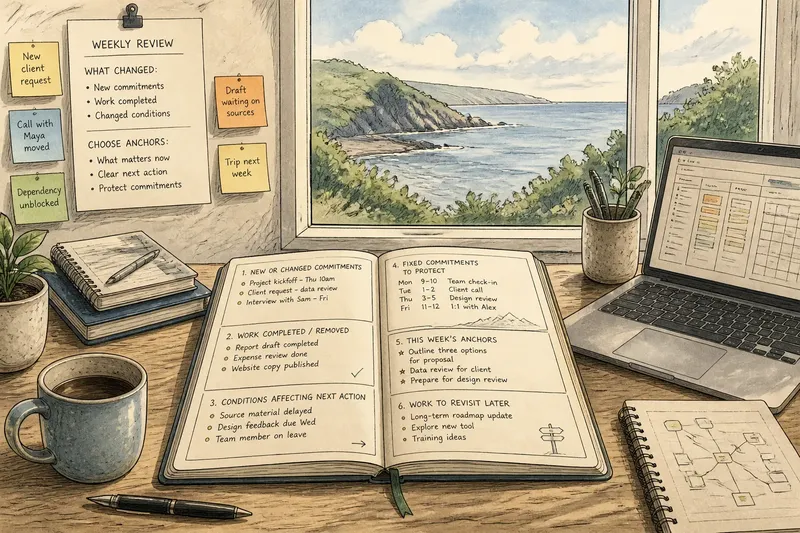
A simple note can hold the result:
- New or changed commitments
- Work completed or removed
- Conditions that affect the next action
- Fixed commitments to protect
- This week’s anchors
- Work to revisit later
Keep the note brief enough to scan when the week becomes noisy. If you use a paper planner, leave a margin for changes; if you use a digital list, keep postponed items out of the active view. These small choices help preserve room for something genuinely new.
Which review approach fits your week?
Choose the change-first scan when new requests and shifting dependencies are the main source of surprise. Start with fixed commitments when your available time is the harder constraint. Combine the two when you need both views, but keep the review focused on decisions rather than exhaustive recordkeeping.
The best weekly review is not the one that predicts every disruption. It is the one that lets you notice when the week has changed and revise your anchors without dragging obsolete assumptions along. A weekly review that starts with what changed makes that adjustment a regular part of planning, while leaving enough room for work you could not have anticipated.