The Myth of the Perfectly Full Week
The myth of the perfectly full week is that every gap is wasted. Leave room for project surprises and keep the next workable decision in view.
The most common weekly-planning mistake is treating every open stretch as a task waiting to be assigned. The myth of the perfectly full week makes a plan look settled, but it leaves no room when a project stalls, a decision changes, or a draft needs another pass. The cost is not just a crowded calendar; it is having to improvise under pressure.
Why does a perfectly full week become fragile?
Open-ended projects rarely move in a straight line. You may draft a proposal, realize that an approval is missing, and have to pause until someone responds. A plan that assigns work to every available stretch has no easy way to accommodate that pause.
Instead, each delay can push another task forward, creating a chain of small rescheduling decisions. The week becomes harder to read because it no longer shows which work is ready and which work depends on something else.
Plan around the work’s conditions, not just its intended sequence. A blank stretch can be useful capacity, while an unready task can remain visible without pretending it has a firm place in the week.
What kinds of space help a project week?
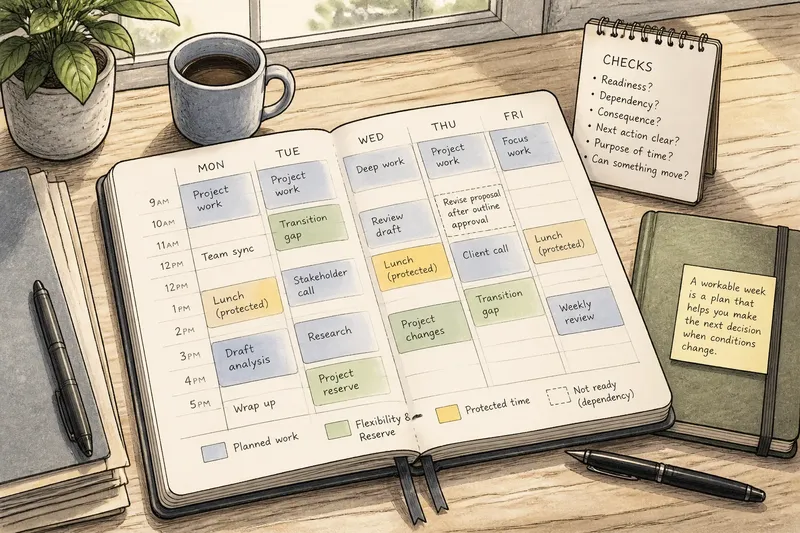
Different kinds of open space serve different purposes. A transition gap helps you move between activities; a reserve block gives a delayed task somewhere to go; a protected break keeps recovery from being quietly converted into more work.
Choose the purpose before the week begins. In Google Calendar, for example, you could mark one block “project changes” and leave a separate lunch break untouched. The label makes the intended use clear without requiring you to predict exactly what will happen.
Open space is not an automatic yes to every new request. It gives you a choice: use the time for a meaningful project change, keep it for recovery, or decide that a request can wait.
How can you decide what deserves room?
Use a few explicit checks to decide whether a task belongs in an open stretch or should wait. For each item, note what you can observe and what decision follows:
- If a task depends on feedback that has not arrived, keep it visible with the dependency; if the feedback arrives, make the task actionable, and if it does not, choose another ready task.
- If a meeting may run long and the next commitment can move, leave a transition gap; if both commitments are fixed, avoid placing extra work between them.
- If a request has a clear consequence if delayed, consider using reserve space; if it is routine and can wait, defer it rather than displacing planned project work.
- If a task has a clear next action but no required time, keep it ready for an open block; if its next action is unclear, write down the decision or information needed first.
- If the open stretch is needed for lunch or recovery, protect it as rest; if it is genuinely available for work, use it only for a task that is ready to begin.
- If every day already has fixed commitments, identify movable work; if nothing can move without a real cost, postpone or renegotiate a lower-priority commitment instead of squeezing in another task.
These checks keep flexibility specific. They also make it easier to distinguish a useful reserve from a vague hope that the week will somehow absorb everything.
How should you handle tasks that are not ready?
A task can matter without being ready for a particular time. “Revise the introduction after approval” names both the work and its condition; “work on project” does not say what would make a useful start possible.
Keep the condition beside the task in a paper notebook, Apple Notes, or Todoist. When the condition changes, decide whether the task is ready and whether it deserves the available time. Until then, do not let a placeholder imply that the work can begin.
Say you have a proposal draft, are waiting for a colleague to approve its outline, and have one open work block later in the week. You write “revise proposal after outline approval” in Todoist, then check for the approval when the block arrives. If approval has come through, you use the block to revise; if it has not, you spend the time organizing the feedback questions instead, leaving the revision for when its prerequisite is met.
What should you do when the week changes?
When a delay or request appears, first identify what changed: the task’s readiness, its urgency, or the amount of time available. Then choose whether to use reserve space, move a flexible task, or defer the new work. This is more useful than shifting every later item by default.
For example, if a review takes longer than expected, use a reserve block only if the review is important enough to displace whatever might otherwise use that time. If the open stretch was meant for rest, keep the break and move a lower-priority task instead.
When there is no sensible place for the new work, treat that as information rather than a scheduling puzzle. Ask whether a deadline can change, a task can be reduced, or someone else needs to make a decision before work continues.
How much open time should a week leave?
Should I schedule every available hour?
No. A week assigned from end to end has little room for a delayed decision or an unexpected revision. Leave some capacity visibly unassigned, especially near work with uncertain timing.
What belongs in an open block?
You can leave it blank or add a light label such as “project reserve.” When the time arrives, choose only work that is ready and fits the block’s purpose.
What if the week has no open space?
Look for movable work and decide what can be postponed or renegotiated. If every commitment is genuinely fixed, avoid disguising overload by packing more into the remaining gaps.
How do I keep open time from becoming more work?
Give the time a boundary, such as “for project changes” or “lunch,” and decide which requests qualify before they arrive. If the block is for rest, do not treat it as spare capacity merely because it appears unbooked.
Why leave the week slightly unfinished?
A workable week is not a perfect sequence; it is a plan that helps you make the next decision when conditions change. Keep tasks’ dependencies visible, reserve room for the kinds of change you can reasonably expect, and protect time that is meant for rest.
The myth of the perfectly full week makes every blank look like a failure to plan. In practice, a deliberate gap can protect a project from false precision. When you review the week, ask not only what is scheduled, but what you will do if the next task is not ready.